Axonite Mail Merge
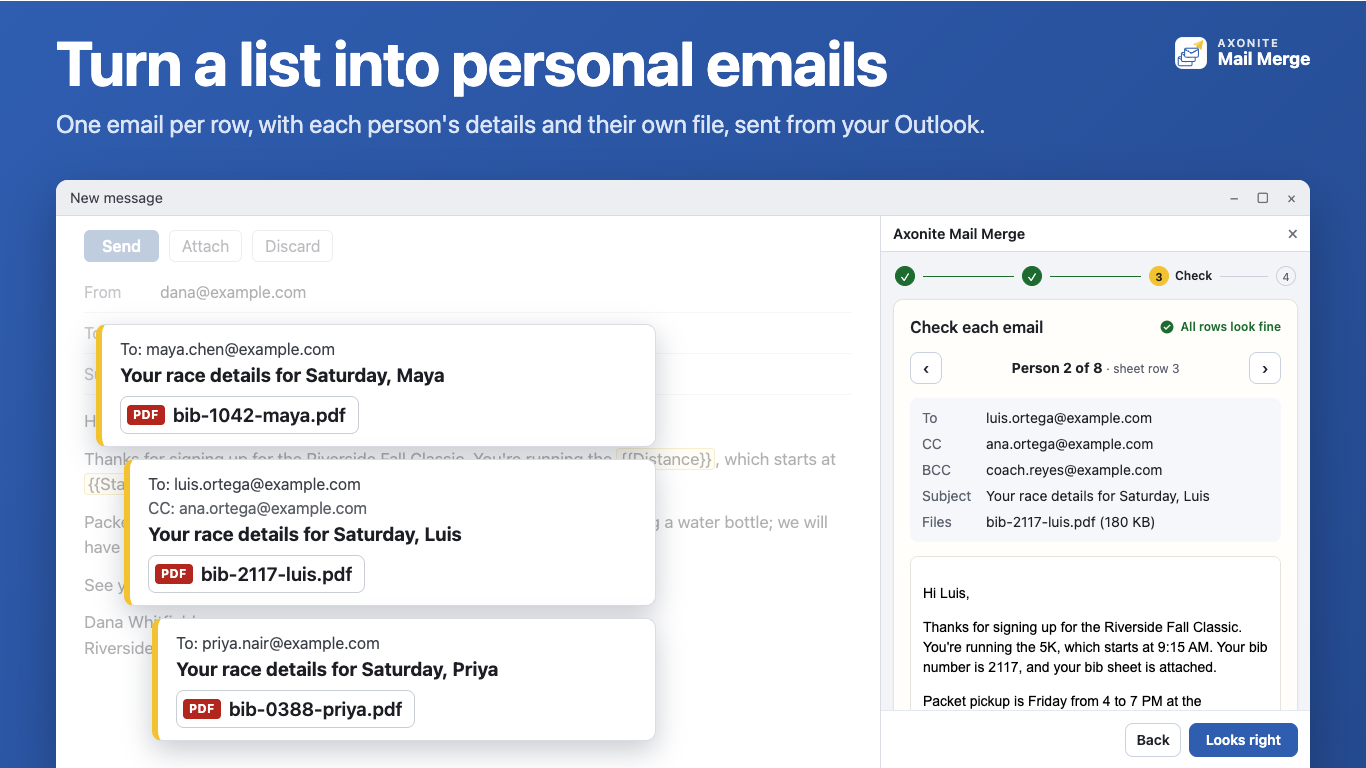
Mail merge for Outlook. Write one email in Outlook and choose an Excel or CSV list. Each person on it gets their own copy from your mailbox, with their details filled in and, if you like, a file of their own.
The Outlook add-in went to Microsoft for review on October 24, 2026, and will be in the Microsoft Marketplace once it's approved. The web version works now, in your browser, at mailmerge.axoniteglobal.com/app.
What it does
- Reads Excel (.xlsx and .xls) and CSV files. It finds the column of email addresses on its own, or you pick it.
- Puts any column into the subject or the message as a field, like {{First name}}, with a fallback for blank cells.
- Attaches a different file to each email, named in an Attachments column. Files attached to your draft go to everyone.
- Adds CC and BCC per row, with several addresses allowed in one cell.
- Sends from a shared mailbox you have Send As rights to, if you tick the box (work and school accounts).
- Lets you step through every email as it will arrive, and sends you a test first. Send stays locked until the test has gone.
- Sends at a steady pace under Microsoft's limits, and splits a big list into parts a day apart.
- Can hand every email to Microsoft with a delivery time, so you can close the app and they still go out later.
Every email ends up in your Sent Items. When the merge finishes, you can download a report with one line per row: sent, scheduled, failed with the reason, or skipped.
Where it works
The add-in runs in Outlook on the web, the new Outlook for Windows, classic Outlook for Windows, and Outlook for Mac. Classic Outlook needs Microsoft 365 (Version 1910 or later), Outlook 2021 or later, or Outlook LTSC 2021 or 2024. It doesn't run in the Outlook apps for iPhone, iPad, or Android.
The web version runs in a browser and signs in with any Microsoft account: work, school, or a personal Outlook.com or Hotmail address. It sends through Microsoft mailboxes only, so Gmail and other providers aren't supported.
Your mail and lists stay on your computer
Your spreadsheet, your message, and your files are read on your computer, and each email goes from there straight to Microsoft, which sends it from your mailbox like any other email you write. Our servers check which plan your mailbox is on and keep simple usage counts. They never see what you send or who you send it to.
There's no open or click tracking, and nothing is added to the emails you send. The privacy policy has the details, and the security page lists every permission for IT teams.
Pricing
Prices are in US dollars. You buy a plan inside the app, and it's matched to your mailbox when you sign in, so there's no license key.
| Plan | Price | What you get |
|---|---|---|
| Free | $0 | Every feature, for up to 25 people a day. CC and BCC count toward the 25. No end date. |
| Individual | $79 a year, or $8 a month | One mailbox, with no daily limit from us. Microsoft's own sending limits still apply. |
| 7-day pass | $19, once | One mailbox, no daily limit for 7 days. It doesn't renew. |
| Teams | 5, 10, or 25 seats: $249, $449, or $999 a year, or $25, $45, or $99 a month | Seats you hand out by email and can take back when someone leaves. |
If it isn't right for you, email within 30 days of your first payment for a refund (24 hours for the 7-day pass). The refund policy covers renewals and canceling. Payments are handled by Lemon Squeezy.
Guides
Help
The help page covers getting started, spreadsheet tips, and approval for IT admins. Questions go to mailmerge@axoniteglobal.com.